

Turn Your Trainer's Spreadsheet into a Gym-Ready App
Find the workout plan your trainer emailed you in Google Sheets, then builds it into a clean, tap-friendly app you can use at the gym on your phone — no coding, no app store, no hassle.
 adaptive
Absolutely. Let me connect your Gmail and find that workout plan. I'll pull it from the Google Sheet and build you a gym-friendly app.
Gmail — Searching for workout plan
Found: "Your 12-Week Program" from coach@trainer.com
Got it — I've read all 12 tabs from the sheet. I'm building you a mobile app with a clean layout: tap into any week, see today's exercises, and check off sets as you go.
Google Sheets — Workout plan imported
12 weeks · 4 days/week · 48 workouts loaded
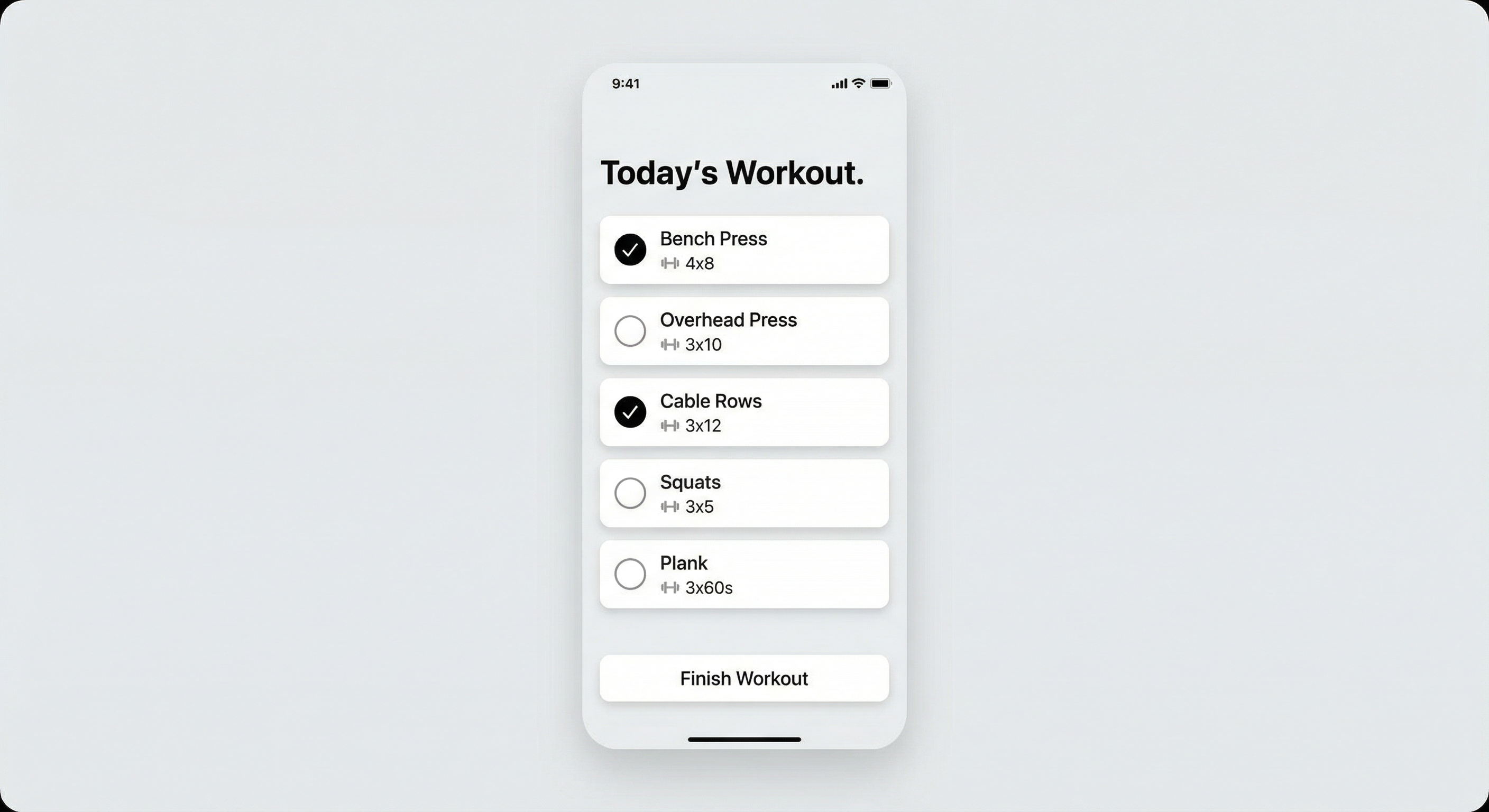
Done. Each exercise now has a weight input field and a progress chart that shows your history across weeks. You'll be able to see at a glance if you're lifting more over time. The app works offline too, so no gym Wi-Fi needed. Here's your app:
Your App Is Ready
adaptive.ai/a/my-workout-plan
How to build a workout app from a Google Sheet with Adaptive
Connect Gmail and find the plan
Link your Gmail account and tell Adaptive to find your trainer's email. It locates the message, opens the Google Sheets link, and reads the entire workout plan automatically.
Adaptive reads your spreadsheet
Adaptive parses every tab, row, and column — exercises, sets, reps, rest times, and weekly progressions. It understands common workout plan formats without you needing to relabel anything.
Your app gets built automatically
Adaptive generates a mobile-friendly web app with your full workout plan. Clean layout, large text, tap-to-complete sets, and easy week-by-week navigation — all designed for use at the gym.
Customize and add features
Want weight logging, progress charts, a rest timer, or exercise notes? Just ask in plain English. Adaptive adds features to your app on the fly — no rebuilds, no waiting.
Everything you need in a gym-ready workout app
Automatic email and sheet discovery
Adaptive finds the workout plan email in Gmail and reads the linked Google Sheet automatically. No manual file uploads or copy-pasting required.
Mobile-first gym interface
Your app is designed for one-handed use at the gym — large tap targets, readable text, and a layout that works on any phone screen.
Set tracking and check-off
Tap to mark sets as complete while you work out. See at a glance what's done and what's next without scrolling through a spreadsheet.
Weight logging and progress charts
Log the actual weight you lifted for each exercise and see your progress over time with simple visual charts. Know exactly when you're getting stronger.
Works offline
The app works in your phone's browser even without Wi-Fi. Load it before you head to the gym and use it with no signal — perfect for basement gyms and dead zones.
No code required
Describe what you want in plain English and Adaptive builds the app for you. No coding, no app store, no subscriptions to yet another fitness platform.
Frequently asked questions
Common questions about workout plan app creation.
With Adaptive, you connect your Gmail and tell it to find your trainer's workout plan. Adaptive opens the Google Sheet, reads every exercise, set, and rep, and builds a mobile-friendly web app automatically. The app has a clean gym interface with tap-to-complete sets, weight logging, and week-by-week navigation. No coding or app development experience needed — the whole process takes minutes.
Yes. Adaptive is a no-code platform that builds custom apps from plain English descriptions. You can start from a Google Sheets workout plan or describe your ideal tracker from scratch. Adaptive generates a mobile-friendly app with features like set check-off, weight logging, progress charts, and rest timers — all without writing a single line of code.
The best approach is to convert the spreadsheet into a mobile app designed for gym use. Adaptive reads your Google Sheets workout plan and builds a tap-friendly phone app with large text, set tracking, and a layout that works while you're standing at the rack. It is far easier to use than pinching and zooming on a spreadsheet, and you can log weights and track progress directly in the app.
Yes. Adaptive connects to your Gmail inbox and can search for emails by sender, subject, or content. When it finds the email with your Google Sheets workout plan, it opens the sheet, reads the data, and uses it to build a mobile app. You don't need to manually download or upload anything — Adaptive handles the entire pipeline from email to app.
Yes. The app Adaptive builds works in your phone's browser and supports offline use. Load the app before you leave for the gym and it works without Wi-Fi or cell signal. Your set completions and weight logs are saved locally and sync when you're back online. This makes it reliable for basement gyms, parking garages, and any gym with poor reception.
Absolutely. After Adaptive builds your initial app from the workout spreadsheet, you can add any feature by describing it in plain English. Want a countdown rest timer between sets? Ask for it. Want progress charts showing your squat max over 12 weeks? Just say so. Adaptive adds features on the fly without rebuilding the app from scratch.
Ready to try it?
Describe what you need in plain English. Adaptive builds it for you in minutes — no code, no consultants, no waiting.
Get started


